Free Online CS2 Demo Viewer
Watch CS2 demos in your browser: sign in with Steam or FACEIT, upload a demo and review rounds, positions and events in 2D. No CS2 installation needed.
Open your CS2 match as an interactive 2D replay. Sign in, upload the downloaded demo and wait for processing, then review rounds, kills and grenades from the match list.
Open your CS2 demo
Upload a match to review rounds, positions and duels in a 2D browser replay.
- Sign in with Steam or FACEIT
- Choose a demo file
- Open the processed match
.dem, .zst, .gz, .bz2 or .zip. Upload compressed demos as they are.
Sign in first, then choose your file here. Steam match-history setup is not required for a manual upload.
2D replay • No CS2 installation • Steam or FACEIT sign-in
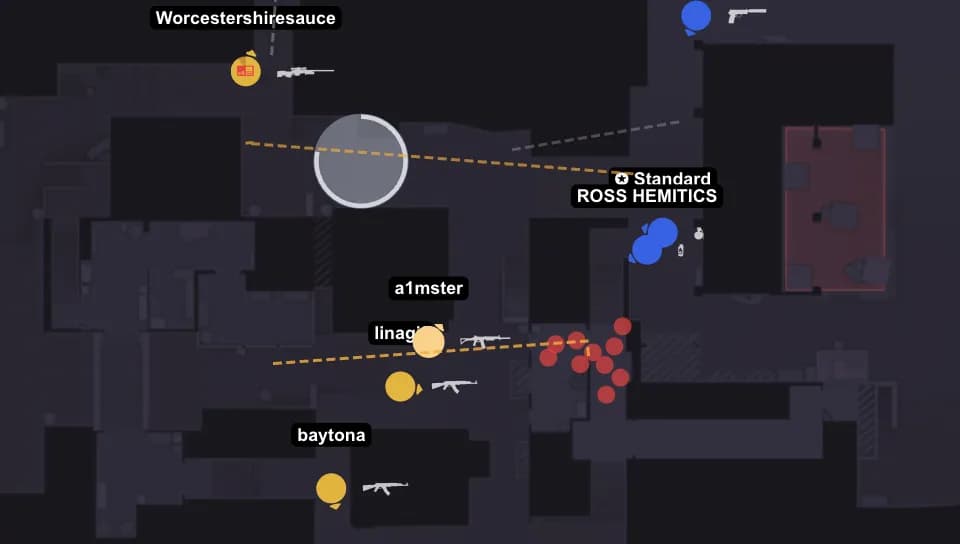
Why Choose Our CS2 Demo Viewer
100% Free
The demo viewer is free and runs in your browser. Sign in with Steam or FACEIT before uploading your own file; use the public example to explore playback.
No CS2 Installation
Watch replays directly in your browser. No need to install CS2 or any additional software.
CS2 Files & Archives
After signing in with Steam or FACEIT, upload a CS2 .dem file or a .zst, .gz, .bz2 or .zip archive. The viewer shows matches on supported CS2 maps.
Interactive 2D Map
See player movements, grenade trajectories, and events visualized on an interactive 2D map.
Detailed Statistics
K/D/A, ADR, heatmaps, clutch situations, grenade effectiveness, and much more.
Share & Review
Share replay links with teammates. Review together and improve as a team.
How to Watch CS2 Demos Online
Sign in with Steam or FACEIT
Use one of the available sign-in providers before uploading your own demo.
Import a demo
Upload a demo file, or use the GetReplay extension to import a FACEIT demo without downloading and uploading it manually.
Watch & Analyze
Use the interactive replay player with Smart Mode, event timeline, and detailed statistics tabs.
FACEIT demos without manual downloads
Install the GetReplay browser extension, sign in to GetReplay and open a completed FACEIT match. Click the GetReplay button: GetReplay downloads and processes the demo automatically. You do not need to save the file to your computer or upload it yourself.
Prefer not to install an extension? You can still download the demo from FACEIT and upload it manually.
On desktop, Chrome Web Store extensions can be installed in Chrome, Microsoft Edge, Yandex Browser, Opera, Brave and Vivaldi.
What Is an Online CS2 Demo Viewer?
A CS2 demo (.dem) records match events for replay. Download an available recording from your match history or the platform where you played. Availability depends on the source.
An online demo viewer skips all of that. GetReplay parses the .dem file on our servers and rebuilds the match as an interactive 2D replay you open in any browser. There's nothing to install, nothing to configure, and no demoui to fight with — you just press play and start analyzing.
Review processed matches in your browser on a computer or phone. Open a match from your account, find a round or event and share the moment with a teammate.
Everything You Can Do With a Demo
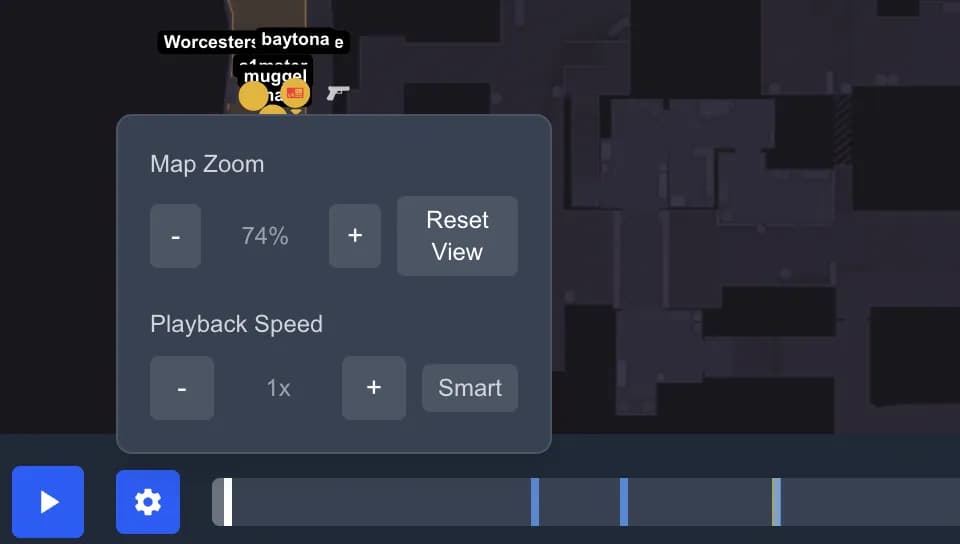
2D Replay with Smart Mode
Watch the whole match on an interactive 2D map. Smart Mode automatically follows the action and skips the dead time between fights, so a 40-minute match takes only minutes to review.
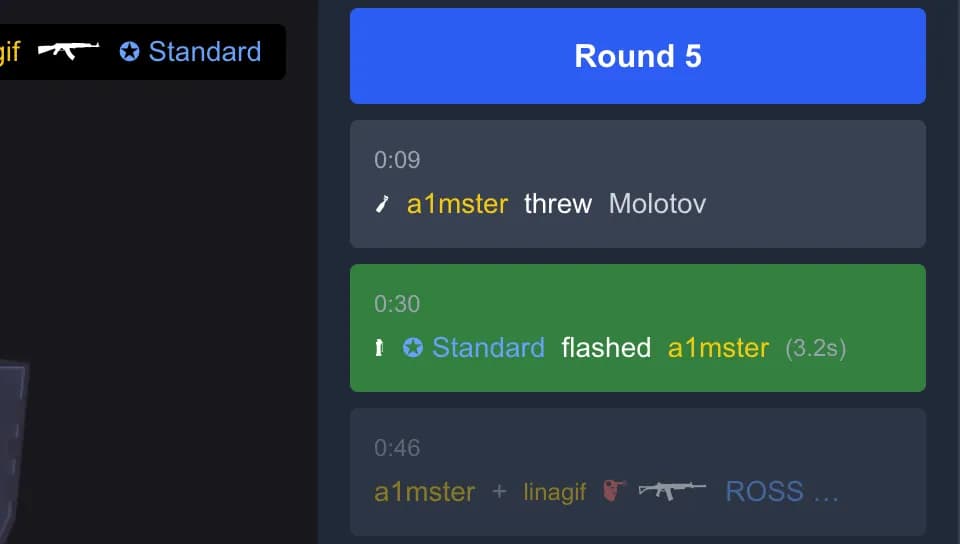
Event Timeline
Every kill, plant, defuse, and utility usage is laid out on a clickable timeline. Jump straight to any round or moment in one click instead of typing demo_gototick in the console.

Position Heatmaps
See where you and your opponents fight, hold, and die on every map. Heatmaps reveal predictable peeks, weak spots, and the angles you keep losing — patterns you can't notice while playing.

Grenade Analysis
Review every flash, smoke, molotov, and HE — where it was thrown from, where it landed, and how much impact it had. Copy the lineups that work and fix the utility that goes to waste.

Clutch & Round Breakdown
Replay 1vX clutches and key rounds step by step to understand exactly what won or lost them — positioning, timing, info, and trades all in one view.

Full Stats & Scoreboard
K/D/A, ADR, headshot %, opening duels, kill and damage matrices, and round-by-round economy. Turn a gut feeling into numbers and track whether you're actually improving.
Supported Demos & Maps
After signing in with Steam or FACEIT, upload a CS2 .dem file or a .zst, .gz, .bz2 or .zip archive. The viewer shows matches on supported CS2 maps.
The 2D viewer uses radar layouts for supported CS2 maps. Map coverage is limited; it does not include every CS2 map.
Online Viewer vs In-Game Demo Playback
Choose browser-based 2D analysis or the in-game 3D camera according to what you want to review.
Benefits for Every Player
For Players
Review your own gameplay, find mistakes, analyze opponent strategies, and improve your skills faster.
For Teams
Share demos with teammates, review strategies together, analyze opponent tactics, and coordinate better.
For Coaches
Professional analysis tools for coaching. Heatmaps, statistics, clutch analysis, and more for effective training.
Frequently Asked Questions
How do I watch a CS2 demo without launching the game?
Open your CS2 match as an interactive 2D replay. Sign in, upload the downloaded demo and wait for processing, then review rounds, kills and grenades from the match list.
How do I open a .dem file?
Open your CS2 match as an interactive 2D replay. Sign in, upload the downloaded demo and wait for processing, then review rounds, kills and grenades from the match list.
Where does CS2 store my demos and how do I find them?
Matchmaking and Premier demos can be downloaded from your match history in the game's Watch tab and are saved under your Steam userdata or the game's replays folder. Download tournament demos from their websites. For FACEIT, you can use the GetReplay browser extension instead: click the GetReplay button in the match room and the server downloads the demo, with no file to save or upload yourself.
How do I download my matchmaking or Premier demos?
Open Counter-Strike 2, go to Watch → Your Matches, and download a recent match. CS2 keeps your recent competitive and Premier matches available for a limited time, so download them before they expire, then upload the .dem to GetReplay.
Can I watch FACEIT demos, and why won't my FACEIT demo open in CS2?
Yes. Install the GetReplay browser extension, sign in to GetReplay and click the GetReplay button in a completed FACEIT match room. GetReplay downloads and processes the demo automatically; you do not need to save the file to your computer or upload it yourself. Without the extension, upload the .zst archive or extracted .dem manually. After processing, open the match from your match list. For a first-person 3D camera, use CS2.
How do I fast-forward or skip rounds in a demo?
In the online viewer you jump to any round or event by clicking the timeline, and Smart Mode auto-skips the dead time between fights. There's no need for the in-game speed controls or typing tick numbers in the console.
What are the CS2 demo playback commands?
In-game you control demos with the demoui panel and commands like demo_pause, demo_resume, demo_gototick, and demo_timescale. GetReplay replaces all of them with simple on-screen controls and a clickable timeline, so you don't have to memorize any commands.
Why does my CS2 demo lag, stutter, or crash, and does watching online fix it?
GetReplay displays a 2D reconstruction without running the CS2 3D engine. Review positions and events directly in the browser, using the timeline to move between rounds.
How do I see the kill feed and who killed whom?
Every kill is shown on the timeline and the scoreboard, and the kill and damage matrices let you see exactly which player killed which opponent, with what weapon, and for how much damage across the whole match.
Can I watch the enemy's point of view?
The 2D replay shows player positions on the map, including opponents. For a first-person 3D view, open the demo in CS2; the browser viewer does not provide that camera.
Is GetReplay free, and do I need to install anything?
The demo viewer is free and runs in your browser. Sign in with Steam or FACEIT before uploading your own file; use the public example to explore playback.
What demo formats and sources are supported?
After signing in with Steam or FACEIT, upload a CS2 .dem file or a .zst, .gz, .bz2 or .zip archive. The viewer shows matches on supported CS2 maps.
How long does it take to process a demo?
Processing time depends on file size and the current queue. Follow the status in the match list and open the replay when it is ready.
Can I share a demo replay with my team?
Yes. Every match and key moment has a shareable link, so you can send a teammate or coach a specific round or clutch to review together — no need for everyone to have the demo file.
Start Analyzing Your CS2 Demos Now
Explore more features: